⛓️ Langflow Integration
Langflow (GitHub) is a UI for LangChain, designed with react-flow to provide an effortless way to experiment and prototype flows.
With the native integration (since langflow v1.0.17), you can use Langflow to quickly create complex LLM applications in no-code and then use Langfuse to monitor and improve them.
Integration
Video guide on how to integrate Langflow with Langfuse (published by Langflow)
Get Langfuse API keys
- Create account and project on cloud.langfuse.com
- Copy API keys for your project
- Follow instructions on self-hosting or local setups
- Copy API keys for your project
Setup Langflow
# API keys from project settings in Langfuse
export LANGFUSE_SECRET_KEY=sk-lf...
export LANGFUSE_PUBLIC_KEY=pk-lf...

export LANGFUSE_HOST="https://cloud.langfuse.com"  # 🇪🇺 for EU data region
# export LANGFUSE_HOST="https://cloud.langfuse.com" # 🇺🇸 for US data region
# export LANGFUSE_HOST="http://localhost:3000" # 🏠 for self-hosters

# Install Langflow
pip install langflow

# Start Langflow in the same terminal or environment where you set the environment variables:
python -m langflow run
Alternatively, you can run the Langflow CLI command with the environment variables set:
LANGFUSE_SECRET_KEY=secret_key LANGFUSE_PUBLIC_KEY=public_key LANGFUSE_HOST="http://localhost:3000" langflowClone the Langflow repository
git clone https://github.com/logspace-ai/langflow.git
cd langflow
Add the environment variables to docker_example/docker-compose.yml
version: '3'

services:
  langflow:
    build:
      context: .
      dockerfile: Dockerfile
    ports:
      - "7860:7860"
    environment:
+     - LANGFUSE_SECRET_KEY=secret_key
+     - LANGFUSE_PUBLIC_KEY=public_key
+     - LANGFUSE_HOST="https://cloud.langfuse.com"
    command: langflow run --host 0.0.0.0
Run Langflow
cd docker_example
docker-compose up --build
See your traces in Langfuse
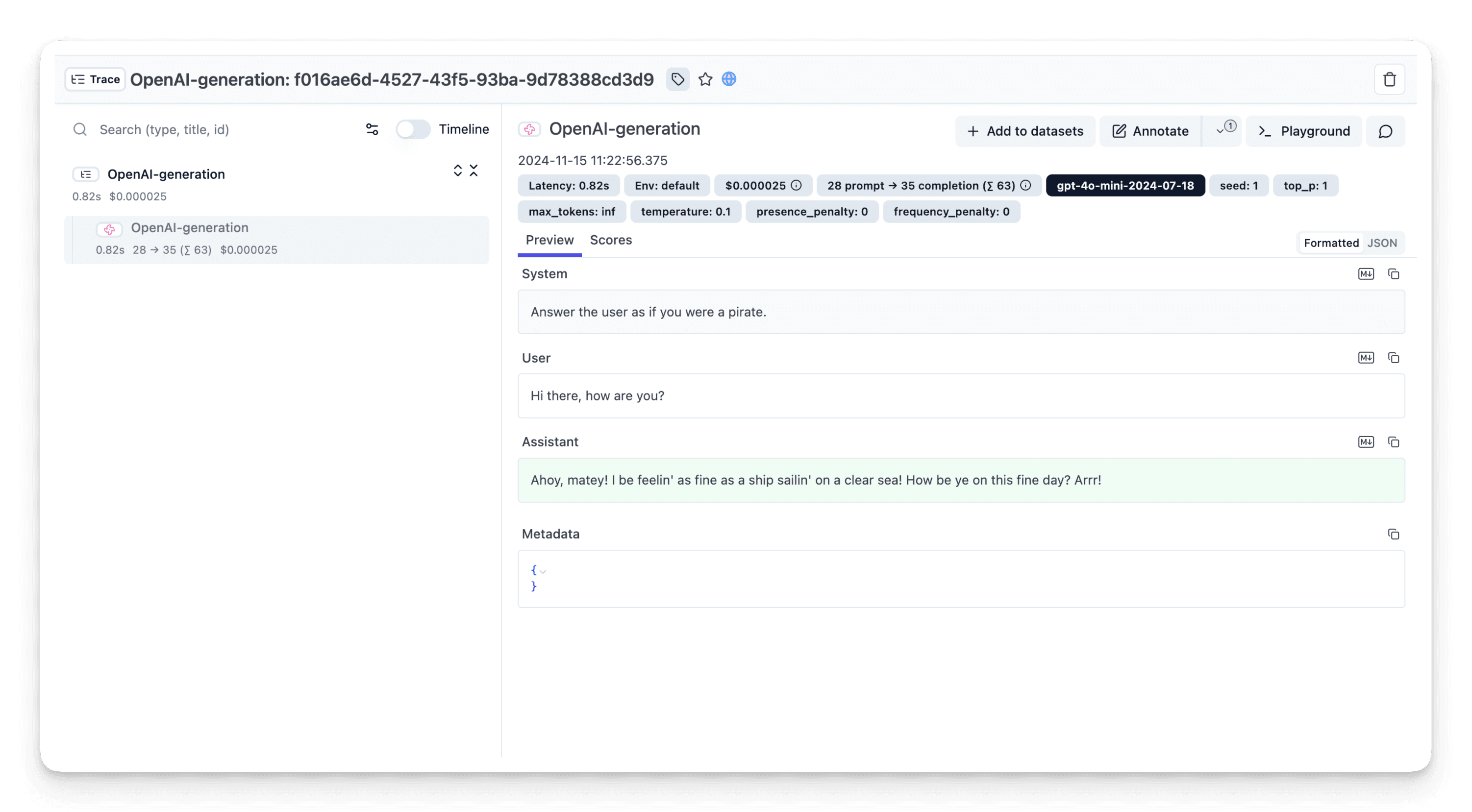
Now, when you use Langflow's chat or API, you can view the trace of your conversations in Langfuse.
Running Langfuse and Langflow with Docker Compose
If you prefer to self-host Langfuse, you can run both services using Docker Compose. By combining the two docker-compose files, you can streamline the networking between them.
version: "3.5"

services:
  # Adapted from https://github.com/logspace-ai/langflow/blob/dev/docker_example/docker-compose.yml
  langflow:
    build:
      context: .
      dockerfile: Dockerfile
    ports:
      - "7860:7860"
    environment:
+     # Tokens are to be created in Langfuse, then copy-pasted here. Then restart docker-compose.
+     - LANGFUSE_SECRET_KEY=sk-lf-...
+     - LANGFUSE_PUBLIC_KEY=pk-lf-...
+     - LANGFUSE_HOST="http://langfuse-server:3000"
    command: langflow run --host 0.0.0.0

  # https://github.com/langfuse/langfuse/blob/main/docker-compose.yml
  langfuse-worker:
    image: langfuse/langfuse-worker:3
    restart: always
    depends_on: &langfuse-depends-on
      postgres:
        condition: service_healthy
      minio:
        condition: service_healthy
      redis:
        condition: service_healthy
      clickhouse:
        condition: service_healthy
    ports:
      - 127.0.0.1:3030:3030
    environment: &langfuse-worker-env
      NEXTAUTH_URL: http://localhost:3000
      DATABASE_URL: postgresql://postgres:postgres@postgres:5432/postgres # CHANGEME
      SALT: "mysalt" # CHANGEME
      ENCRYPTION_KEY: "0000000000000000000000000000000000000000000000000000000000000000" # CHANGEME: generate via `openssl rand -hex 32`
      TELEMETRY_ENABLED: ${TELEMETRY_ENABLED:-true}
      LANGFUSE_ENABLE_EXPERIMENTAL_FEATURES: ${LANGFUSE_ENABLE_EXPERIMENTAL_FEATURES:-true}
      CLICKHOUSE_MIGRATION_URL: ${CLICKHOUSE_MIGRATION_URL:-clickhouse://clickhouse:9000}
      CLICKHOUSE_URL: ${CLICKHOUSE_URL:-http://clickhouse:8123}
      CLICKHOUSE_USER: ${CLICKHOUSE_USER:-clickhouse}
      CLICKHOUSE_PASSWORD: ${CLICKHOUSE_PASSWORD:-clickhouse} # CHANGEME
      CLICKHOUSE_CLUSTER_ENABLED: ${CLICKHOUSE_CLUSTER_ENABLED:-false}
      LANGFUSE_S3_EVENT_UPLOAD_BUCKET: ${LANGFUSE_S3_EVENT_UPLOAD_BUCKET:-langfuse}
      LANGFUSE_S3_EVENT_UPLOAD_REGION: ${LANGFUSE_S3_EVENT_UPLOAD_REGION:-auto}
      LANGFUSE_S3_EVENT_UPLOAD_ACCESS_KEY_ID: ${LANGFUSE_S3_EVENT_UPLOAD_ACCESS_KEY_ID:-minio}
      LANGFUSE_S3_EVENT_UPLOAD_SECRET_ACCESS_KEY: ${LANGFUSE_S3_EVENT_UPLOAD_SECRET_ACCESS_KEY:-miniosecret} # CHANGEME
      LANGFUSE_S3_EVENT_UPLOAD_ENDPOINT: ${LANGFUSE_S3_EVENT_UPLOAD_ENDPOINT:-http://minio:9000}
      LANGFUSE_S3_EVENT_UPLOAD_FORCE_PATH_STYLE: ${LANGFUSE_S3_EVENT_UPLOAD_FORCE_PATH_STYLE:-true}
      LANGFUSE_S3_EVENT_UPLOAD_PREFIX: ${LANGFUSE_S3_EVENT_UPLOAD_PREFIX:-events/}
      LANGFUSE_S3_MEDIA_UPLOAD_BUCKET: ${LANGFUSE_S3_MEDIA_UPLOAD_BUCKET:-langfuse}
      LANGFUSE_S3_MEDIA_UPLOAD_REGION: ${LANGFUSE_S3_MEDIA_UPLOAD_REGION:-auto}
      LANGFUSE_S3_MEDIA_UPLOAD_ACCESS_KEY_ID: ${LANGFUSE_S3_MEDIA_UPLOAD_ACCESS_KEY_ID:-minio}
      LANGFUSE_S3_MEDIA_UPLOAD_SECRET_ACCESS_KEY: ${LANGFUSE_S3_MEDIA_UPLOAD_SECRET_ACCESS_KEY:-miniosecret} # CHANGEME
      LANGFUSE_S3_MEDIA_UPLOAD_ENDPOINT: ${LANGFUSE_S3_MEDIA_UPLOAD_ENDPOINT:-http://localhost:9090}
      LANGFUSE_S3_MEDIA_UPLOAD_FORCE_PATH_STYLE: ${LANGFUSE_S3_MEDIA_UPLOAD_FORCE_PATH_STYLE:-true}
      LANGFUSE_S3_MEDIA_UPLOAD_PREFIX: ${LANGFUSE_S3_MEDIA_UPLOAD_PREFIX:-media/}
      LANGFUSE_S3_BATCH_EXPORT_ENABLED: ${LANGFUSE_S3_BATCH_EXPORT_ENABLED:-false}
      LANGFUSE_S3_BATCH_EXPORT_BUCKET: ${LANGFUSE_S3_BATCH_EXPORT_BUCKET:-langfuse}
      LANGFUSE_S3_BATCH_EXPORT_PREFIX: ${LANGFUSE_S3_BATCH_EXPORT_PREFIX:-exports/}
      LANGFUSE_S3_BATCH_EXPORT_REGION: ${LANGFUSE_S3_BATCH_EXPORT_REGION:-auto}
      LANGFUSE_S3_BATCH_EXPORT_ENDPOINT: ${LANGFUSE_S3_BATCH_EXPORT_ENDPOINT:-http://minio:9000}
      LANGFUSE_S3_BATCH_EXPORT_EXTERNAL_ENDPOINT: ${LANGFUSE_S3_BATCH_EXPORT_EXTERNAL_ENDPOINT:-http://localhost:9090}
      LANGFUSE_S3_BATCH_EXPORT_ACCESS_KEY_ID: ${LANGFUSE_S3_BATCH_EXPORT_ACCESS_KEY_ID:-minio}
      LANGFUSE_S3_BATCH_EXPORT_SECRET_ACCESS_KEY: ${LANGFUSE_S3_BATCH_EXPORT_SECRET_ACCESS_KEY:-miniosecret} # CHANGEME
      LANGFUSE_S3_BATCH_EXPORT_FORCE_PATH_STYLE: ${LANGFUSE_S3_BATCH_EXPORT_FORCE_PATH_STYLE:-true}
      LANGFUSE_INGESTION_QUEUE_DELAY_MS: ${LANGFUSE_INGESTION_QUEUE_DELAY_MS:-}
      LANGFUSE_INGESTION_CLICKHOUSE_WRITE_INTERVAL_MS: ${LANGFUSE_INGESTION_CLICKHOUSE_WRITE_INTERVAL_MS:-}
      REDIS_HOST: ${REDIS_HOST:-redis}
      REDIS_PORT: ${REDIS_PORT:-6379}
      REDIS_AUTH: ${REDIS_AUTH:-myredissecret} # CHANGEME
      REDIS_TLS_ENABLED: ${REDIS_TLS_ENABLED:-false}
      REDIS_TLS_CA: ${REDIS_TLS_CA:-/certs/ca.crt}
      REDIS_TLS_CERT: ${REDIS_TLS_CERT:-/certs/redis.crt}
      REDIS_TLS_KEY: ${REDIS_TLS_KEY:-/certs/redis.key}

  langfuse-web:
    image: langfuse/langfuse:3
    restart: always
    depends_on: *langfuse-depends-on
    ports:
      - 3000:3000
    environment:
      <<: *langfuse-worker-env
      NEXTAUTH_SECRET: mysecret # CHANGEME
      LANGFUSE_INIT_ORG_ID: ${LANGFUSE_INIT_ORG_ID:-}
      LANGFUSE_INIT_ORG_NAME: ${LANGFUSE_INIT_ORG_NAME:-}
      LANGFUSE_INIT_PROJECT_ID: ${LANGFUSE_INIT_PROJECT_ID:-}
      LANGFUSE_INIT_PROJECT_NAME: ${LANGFUSE_INIT_PROJECT_NAME:-}
      LANGFUSE_INIT_PROJECT_PUBLIC_KEY: ${LANGFUSE_INIT_PROJECT_PUBLIC_KEY:-}
      LANGFUSE_INIT_PROJECT_SECRET_KEY: ${LANGFUSE_INIT_PROJECT_SECRET_KEY:-}
      LANGFUSE_INIT_USER_EMAIL: ${LANGFUSE_INIT_USER_EMAIL:-}
      LANGFUSE_INIT_USER_NAME: ${LANGFUSE_INIT_USER_NAME:-}
      LANGFUSE_INIT_USER_PASSWORD: ${LANGFUSE_INIT_USER_PASSWORD:-}

  clickhouse:
    image: clickhouse/clickhouse-server
    restart: always
    user: "101:101"
    environment:
      CLICKHOUSE_DB: default
      CLICKHOUSE_USER: clickhouse
      CLICKHOUSE_PASSWORD: clickhouse # CHANGEME
    volumes:
      - langfuse_clickhouse_data:/var/lib/clickhouse
      - langfuse_clickhouse_logs:/var/log/clickhouse-server
    ports:
      - 127.0.0.1:8123:8123
      - 127.0.0.1:9000:9000
    healthcheck:
      test: wget --no-verbose --tries=1 --spider http://localhost:8123/ping || exit 1
      interval: 5s
      timeout: 5s
      retries: 10
      start_period: 1s

  minio:
    image: minio/minio
    restart: always
    entrypoint: sh
    # create the 'langfuse' bucket before starting the service
    command: -c 'mkdir -p /data/langfuse && minio server --address ":9000" --console-address ":9001" /data'
    environment:
      MINIO_ROOT_USER: minio
      MINIO_ROOT_PASSWORD: miniosecret # CHANGEME
    ports:
      - 9090:9000
      - 127.0.0.1:9091:9001
    volumes:
      - langfuse_minio_data:/data
    healthcheck:
      test: ["CMD", "mc", "ready", "local"]
      interval: 1s
      timeout: 5s
      retries: 5
      start_period: 1s

  redis:
    image: redis:7
    restart: always
    # CHANGEME: row below to secure redis password
    command: >
      --requirepass ${REDIS_AUTH:-myredissecret}
    ports:
      - 127.0.0.1:6379:6379
    healthcheck:
      test: ["CMD", "redis-cli", "ping"]
      interval: 3s
      timeout: 10s
      retries: 10

  postgres:
    image: postgres:${POSTGRES_VERSION:-latest}
    restart: always
    healthcheck:
      test: ["CMD-SHELL", "pg_isready -U postgres"]
      interval: 3s
      timeout: 3s
      retries: 10
    environment:
      POSTGRES_USER: postgres
      POSTGRES_PASSWORD: postgres # CHANGEME
      POSTGRES_DB: postgres
    ports:
      - 127.0.0.1:5432:5432
    volumes:
      - langfuse_postgres_data:/var/lib/postgresql/data

volumes:
  langfuse_postgres_data:
    driver: local
  langfuse_clickhouse_data:
    driver: local
  langfuse_clickhouse_logs:
    driver: local
  langfuse_minio_data:
    driver: local
To test the connectivity between Langflow and Langfuse, run the following command:
docker compose exec langflow python -c "import requests, os; addr = os.environ.get('LANGFUSE_HOST'); print(addr); res = requests.get(addr, timeout=5); print(res.status_code)"

# which should output the following:
# http://langfuse-server:3000
# 200
